 ClearOrigin
How to check whether an image contains AI provenance
Read embedded evidence without turning an absent record into a claim about origin.
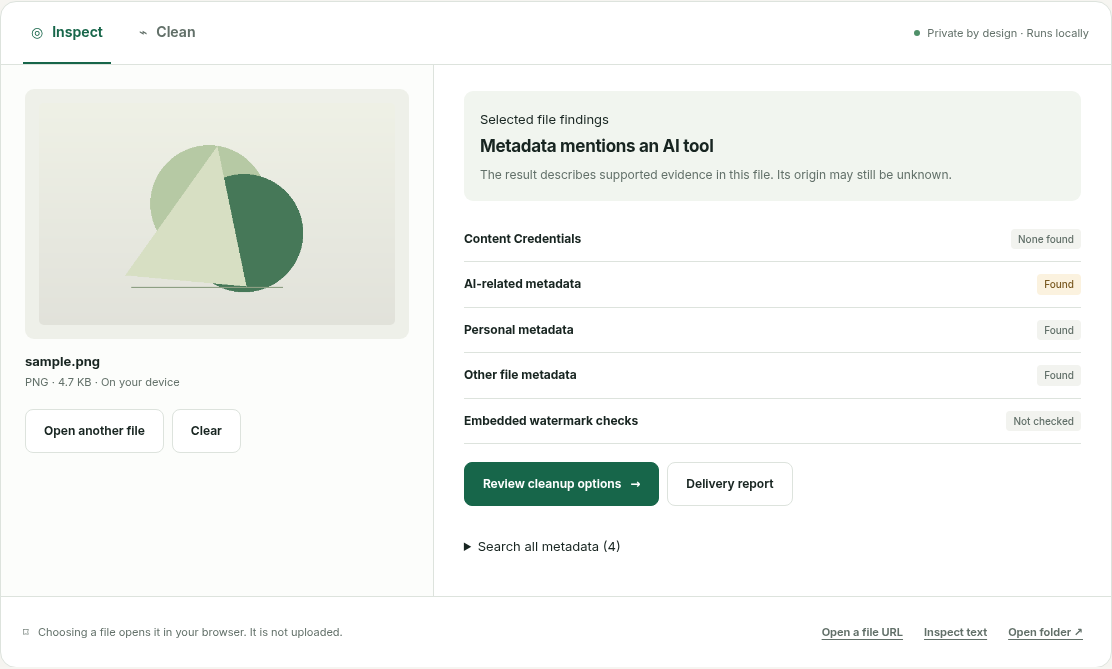
Start with the original file
Download the original asset rather than taking a screenshot. Screenshots and social platforms may discard metadata. Open it in the local inspector and review each evidence group.
Read the strongest evidence carefully
A validated signature can bind a provenance record to an asset. Read the actual recorded action: an ordinary camera capture or crop is not an AI-generation claim. Signer trust is separate, and this build has no configured trust list.
Treat generator metadata as editable
The bundled studio example records “Stable Diffusion” in a Software field. That is a concrete metadata claim, deliberately labeled unverified. It is not a detector score. Anyone able to edit metadata could change that field.
Keep an unknown result unknown
If no supported evidence is found, the origin remains unknown. Pixel watermarks and statistical classifiers are not checked. Save a local delivery report if you need to record exactly what was checked.
Files are processed locally. Account and payment information is separate. Read the privacy explanation.